

Anycubic Kobra 3 Max Review: Is This Huge Bedslinger Worth It?
Quick verdict
The Anycubic Kobra 3 Max makes sense when a 420 × 420 × 500 mm build area will eliminate seams or let you batch genuinely large parts. Its automation and optional ACE Pro are useful, but the moving bed, huge footprint, open frame, long-job risk, and color-change waste make it a poor default desktop printer. Buy for measured part dimensions, not maximum-speed marketing.
Research disclosure: This is a research-based buyer analysis, not a claimed JCPRINTFARM hands-on test. We checked Anycubic's current product page and support documentation, then cross-checked positioning, setup, print behavior, and workflow tradeoffs against independent coverage from Tom's Hardware and All3DP. Stock, pricing, firmware, and bundles can change.
What the Anycubic Kobra 3 Max is
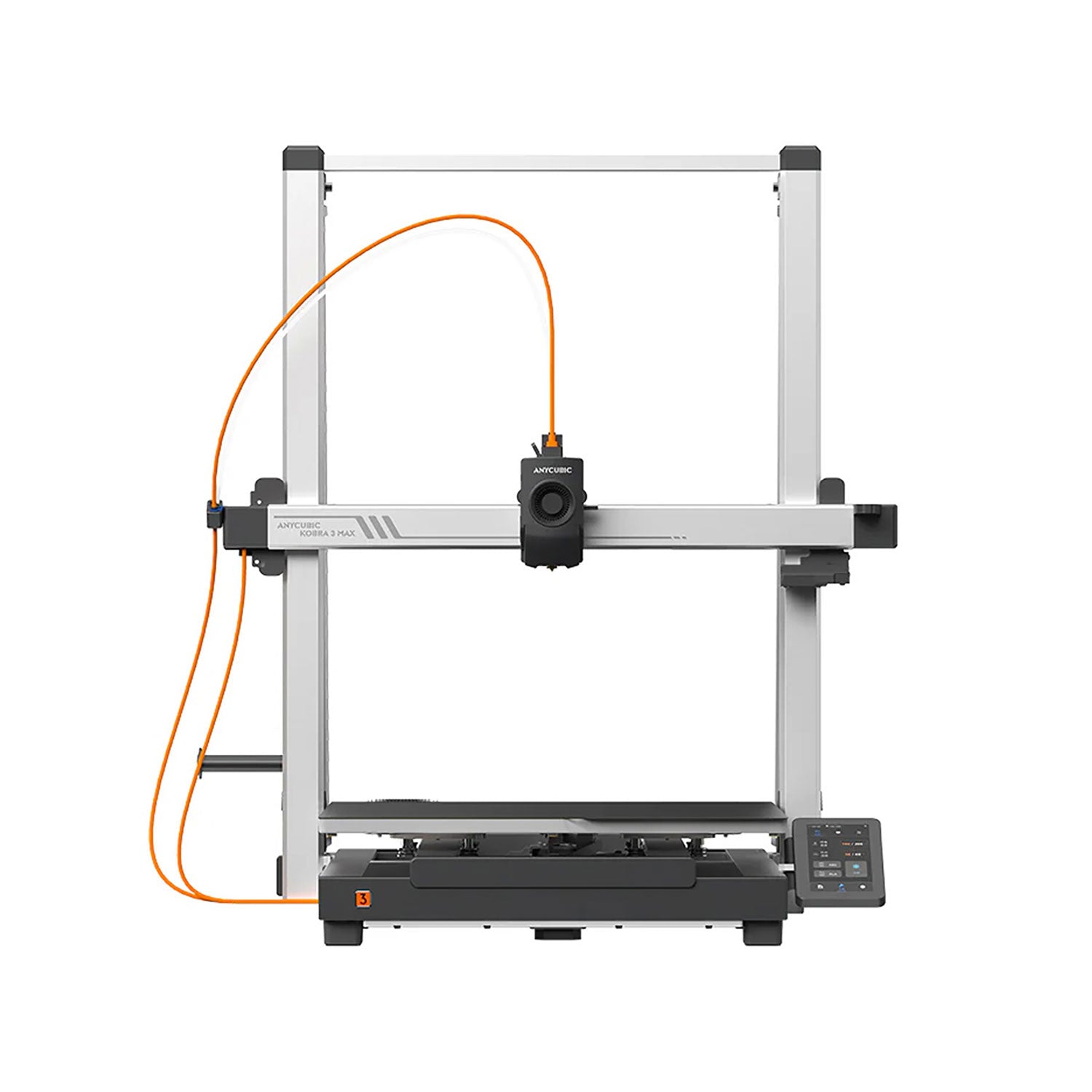
The Kobra 3 Max is an open-frame, large-format Cartesian bed-slinger built around a 420 × 420 mm moving build plate and 500 mm of Z height. Anycubic lists an 88-liter build volume, a 300°C hotend, a 90°C PEI spring-steel bed, automatic leveling and Z-offset, flow calibration, filament monitoring, and a 4.3-inch touchscreen. The machine can print from a single spool or connect to an optional ACE Pro for four-color switching; two ACE Pro units and the appropriate hub expand the advertised workflow to eight colors.
That combination is unusual. Many consumer multicolor systems are much smaller, while many machines near this build volume focus on single-material output. The Kobra 3 Max targets cosplay pieces, props, signs, prototypes, tall housings, and batches that would otherwise be split across plates. It does not provide an enclosure or heated chamber, so size should not be confused with industrial material capability.
Who should buy it—and who should skip it
Best fit: makers and small shops with a recurring need for parts that exceed a normal 250 or 300 mm bed, enough floor or bench space for the full moving-bed envelope, and the patience to tune large jobs. It is especially defensible when avoiding one structural seam materially improves a prop, pattern, mold master, display, or low-load enclosure.
Skip it: buyers whose files usually fit a standard desktop printer, anyone expecting chambered ABS or engineering-material production, and operators who cannot tolerate a multi-day failure near the end of a large print. A smaller enclosed CoreXY machine is usually the better general-purpose choice. A print farm should also be cautious: one enormous moving plate concentrates capacity and failure risk instead of distributing work across several independent machines.
Key specifications in practical context
| Specification | What it means in use |
|---|---|
| 420 × 420 × 500 mm build volume | Enough room for many helmet-scale parts, tall props, large patterns, or dense batches without splitting. The moving bed needs additional front-and-back clearance beyond the nominal machine dimensions. |
| 706 × 640 × 753 mm listed machine size; 19 kg | This is not a casual shelf printer. Measure the operating envelope, cable clearance, purge area, and access for maintenance before ordering. |
| 300 mm/s recommended; 600 mm/s maximum advertised speed | The maximum is a motion-system ceiling. Large-part quality depends on acceleration, flow, cooling, geometry, and bed movement. Tom's Hardware described roughly 200 mm/s as a realistic cruising pace in its testing. |
| 300°C hotend; 0.4 mm standard nozzle; 0.6 and 0.8 mm options | Larger nozzles can reduce line count on big parts, but the open frame and 90°C bed still constrain warp-prone material use. |
| Dual-motor Y and dual-motor, dual-screw Z motion | The extra drive hardware is sensible for a heavy bed and wide gantry, though it cannot remove the inertia inherent in moving a large print. |
| LeviQ 3.0 auto-leveling and automatic Z-offset | Automation reduces setup work across a very large plate. Users should still inspect the full first layer before committing kilograms of filament. |
| ACE Pro optional; four or eight colors advertised | Automatic color switching and active drying are convenient, but each change adds purge waste, time, tubing, and another subsystem to troubleshoot. TPU bypasses the ACE Pro. |
Strengths
A legitimately large build volume
The principal advantage is simple and measurable: 420 × 420 × 500 mm is far larger than the 250 mm class. That can remove joining, alignment, sanding, and reinforcement work from a large model. It can also hold many smaller pieces, although batch density only pays off when the entire plate is dependable and a single failure will not ruin neighboring parts.
Automation appropriate to the bed size
Automatic leveling, Z-offset handling, input shaping, flow calibration, power-loss recovery, runout detection, and entanglement detection reduce the number of manual checks associated with older large-format bedslingers. Tom's Hardware found the model a major improvement over the Kobra 2 Max and specifically praised its leveling, motion compensation, slicer, and general performance. That is one review unit, not a fleet reliability guarantee, but it is encouraging independent evidence.
Multicolor is available without shrinking the machine
The ACE Pro gives large props, signs, labels, display parts, and decorative pieces automatic color changes plus active filament drying. The base printer still supports ordinary single-spool work, so buyers do not have to accept the extra hardware when their output is functional and monochrome.
The nozzle ecosystem suits large work
Anycubic lists 0.6 and 0.8 mm nozzle options in addition to the standard 0.4 mm. For large, low-detail parts, a wider line can be more valuable than chasing travel-speed headlines. The useful comparison is completed part time at acceptable quality, not the fastest empty move.
Limitations and hidden workflow costs
The bed moves a large mass
As a print grows, the Y-axis must accelerate the plate plus the part. Tall narrow geometry, weak bed adhesion, and top-heavy models deserve conservative acceleration and speed. A 500 mm-tall capability does not mean every 500 mm-tall shape is a sensible one-piece bedslinger job. Orientation, footprint, center of mass, bracing, and the consequences of a layer shift all matter.
Large capacity magnifies long-print risk
An 88-liter envelope can consume kilograms of filament and days of machine time. Before a major job, validate the sliced weight, spool changes, support strategy, first layer, power stability, nozzle condition, and whether the model can survive a pause. Power-loss recovery is useful, but it is not equivalent to an uninterruptible power supply and cannot correct every interruption cleanly.
The open frame limits material ambition
Anycubic lists PLA, PETG, and TPU for the current Kobra 3 Max specification, with TPU excluded from ACE Pro feeding. Even where a hotend can reach the temperature required by other polymers, a huge open bed remains exposed to drafts and uneven cooling. Buyers who need repeatable ABS, ASA, nylon, or polycarbonate work should prioritize an appropriate enclosure, chamber control, ventilation, and validated material profiles rather than extrapolating from nozzle temperature.
Color switching can be expensive at this scale
The single nozzle must unload and purge between colors. A model with hundreds of tool changes can turn a large build into a large waste stream. Tom's Hardware noted that the current slicer can tune purge volumes and use purge objects, which helps, but it does not eliminate transition material. Check the slicer's total filament estimate—including purge—before starting.
The footprint extends beyond the frame
Anycubic lists the machine at 706 × 640 × 753 mm, but a moving-bed printer needs safe travel clearance. Add room for cables, the screen, spool or ACE Pro, discarded purge material, and hands-on service. A rigid low surface is preferable to a tall lightweight desk. Also verify the circuit and room conditions for the 800 W AC-heated bed described by Anycubic.
The camera is not a standard built-in feature
Tom's Hardware reported that the camera was optional on its unit. That matters more on long unattended jobs, and Anycubic's current specification shows video monitoring as absent while listing AI spaghetti detection support. Buyers should confirm the exact bundle and required accessory instead of assuming every advertised monitoring function works out of the box.
Single-color or ACE Pro?
For large functional parts, patterns, molds, and props that will be painted, the single-spool configuration is simpler. It reduces tubing, purge, color-change time, and failure points. The ACE Pro earns its space when color separation is part of the finished value—for example, integrated labels, signage, decorative details, or multipart kits that benefit from automatic spool selection.
Drying is useful even for single-color work, but it should not make the combo automatic. Compare the ACE Pro price and footprint with a dedicated dryer, and remember that flexible TPU should feed directly to the toolhead. Two ACE units for eight-color work multiply routing complexity and purge decisions.
Large-format planning checklist
- Measure the largest real part you expect to print; do not buy capacity from a hypothetical someday file.
- Measure the full operating space, including bed travel, spool or ACE Pro, cables, purge output, and service access.
- Slice representative parts before purchase and record time, filament, purge, supports, and likely spool changes.
- Decide whether splitting and joining on a smaller printer would actually be cheaper and lower risk.
- Budget for wider nozzles, spare build surfaces, wear parts, filament drying, and enough identical filament lots for large jobs.
- Confirm seller, current clearance status, bundle contents, warranty, return window, firmware, and replacement-part availability.
- Plan smoke detection, ventilation, electrical load, and supervision for long prints; no consumer printer should be treated as consequence-free unattended equipment.
Lifecycle and availability in 2026
All3DP covered the Kobra 3 Max Combo's preorder opening in December 2024. When this article was researched in September 2026, Anycubic's US store still listed the Kobra 3 Max as shipping but labeled it a clearance offer. That does not make the printer unsupported, and the official wiki remains available, but it changes the purchase calculus. Verify stock and service terms at checkout, and compare the delivered price with current alternatives rather than anchoring on the crossed-out list price.
Alternatives worth comparing
Anycubic Kobra 3: if your parts fit 250 × 250 × 260 mm, the smaller machine demands far less room. Read our Anycubic Kobra 3 review for the original model's lifecycle and ACE Pro tradeoffs.
Elegoo Neptune 4 Plus: a less extreme large bedslinger for buyers who need more than a standard plate without jumping to 420 mm. Our Neptune 4 Plus review covers that middle ground.
Enclosed CoreXY printers: if material control and everyday versatility matter more than absolute size, compare an enclosed machine such as the Bambu Lab X1 Carbon. It is dramatically smaller, but its enclosure and integrated workflow may fit functional production better.
Split the file or outsource it: a well-designed keyed joint can make a standard printer more economical than maintaining a giant machine. For finished parts, JCPRINTFARM can evaluate orientation, segmentation, material, and production risk before hardware is purchased.
Final verdict
The Anycubic Kobra 3 Max has a clear reason to exist: it brings modern automation and optional multicolor feeding to a genuinely huge consumer-format build volume. That does not make it a universal upgrade. Its moving-bed physics, open frame, space demand, long-job exposure, and purge overhead are the price of that capacity. It is a good specialist buy when real files repeatedly justify 420 × 420 × 500 mm. If most parts fit a normal desktop machine, buy the smaller, easier tool.
If you need large finished parts without dedicating space and labor to another printer, explore JCPRINTFARM's production 3D printing service or send a project through the farm intake page. Browse more model-specific coverage on the 3D printer reviews hub.
Sources checked
- Anycubic Kobra 3 Max official product page — current specifications, exact-model image, bundle details, and clearance/availability context.
- Anycubic Kobra 3 Max support wiki — exact-model documentation and ongoing support context.
- Tom's Hardware Kobra 3 Max Combo review — independent setup, speed, motion, slicer, camera, ACE Pro, and print-behavior observations.
- All3DP Kobra 3 Max Combo preorder coverage — independent launch and lifecycle context.