

Anycubic Kobra S1 Review: Enclosed CoreXY Value or Multicolor Compromise?
Quick verdict
The Anycubic Kobra S1 is a credible enclosed CoreXY printer for fast single-color work and buyers who want an optional four-color ACE Pro with active drying. Its 250 mm cube, 320°C hotend, camera, and automation are competitive. The main caution is multicolor workflow: independent testing found slow changes, heavy purge waste, and weak purge accounting. Buy it for the printer first, not just the color count.
Research disclosure: This is a research-based buyer analysis, not a claimed JCPRINTFARM hands-on test. We checked Anycubic's current product page and support documentation, then cross-checked setup, print behavior, software, and multicolor workflow against independent reviews from Tom's Hardware and TechRadar. Prices, bundles, firmware, and stock can change.
What the Anycubic Kobra S1 is
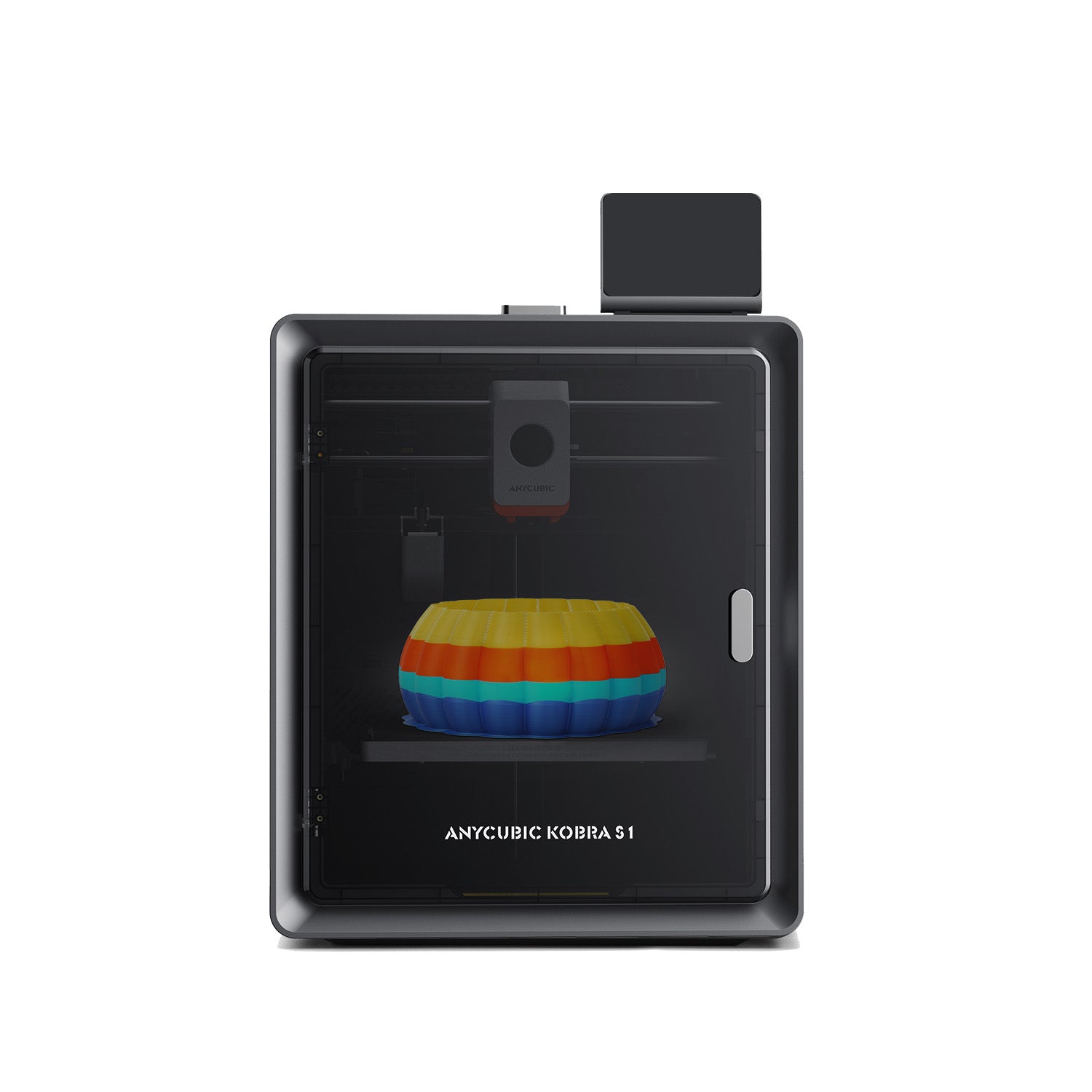
The Kobra S1 is Anycubic's enclosed desktop CoreXY machine with a 250 × 250 × 250 mm build volume. It has a direct-drive toolhead, 320°C hotend, automatic bed leveling, input shaping, filament monitoring, power-loss recovery, a built-in camera, and an advertised motion ceiling of 600 mm/s. The enclosure and stationary bed separate it from Anycubic's open-frame Kobra 3 bedslingers.
The printer works from one spool by itself. The Kobra S1 Combo adds one ACE Pro, Anycubic's four-spool automatic material system. A second ACE Pro and the required connection hardware expand the advertised workflow to eight colors. The ACE Pro can actively dry while printing at up to 55°C, but automatic switching uses one nozzle, so every color change adds unloading, loading, purging, time, and waste.
Who should buy it—and who should skip it
Best fit: a hobbyist, designer, or small shop that wants an enclosed 250 mm-class printer for repeatable PLA, PETG, and selected higher-temperature material work, values a compact CoreXY footprint, and sees multicolor as an occasional capability rather than the default for every part. It is especially attractive when the delivered price undercuts other enclosed ecosystem printers.
Skip it: buyers whose main goal is high-volume multicolor production, operators who need exact pre-print purge-cost forecasting, anyone expecting a passively enclosed consumer printer to behave like a validated industrial heated chamber, and shops that already standardized another fleet ecosystem. An open printer may also be cheaper and easier when the queue is almost entirely PLA.
Key specifications in useful context
| Specification | What it means in use |
|---|---|
| 250 × 250 × 250 mm build volume | A practical desktop cube for housings, fixtures, organizers, props, and batches of small parts. It is larger than compact machines without becoming a large-format space commitment. |
| Fully enclosed CoreXY layout | The bed does not shuttle a tall print back and forth. The enclosure reduces drafts and contains motion, but ventilation and material-specific safety still matter. |
| 320°C hotend | Provides temperature headroom for more than basic PLA, but nozzle temperature alone does not guarantee reliable ABS, ASA, nylon, PC, or composite production. |
| 600 mm/s maximum; 300 mm/s recommended by Anycubic | The maximum is a motion-system claim. Useful speed depends on flow, acceleration, layer cooling, geometry, surface finish, and the selected material profile. |
| Automatic leveling, vibration compensation, flow calibration | Reduces initial setup work. Operators should still inspect the first layer and qualify a profile before a long or expensive production job. |
| ACE Pro optional; four colors per unit | Adds automatic switching and active drying. The convenience must be balanced against purge material, longer jobs, extra tubes, and more failure points. |
| Built-in camera and network workflow | Useful for checking long jobs remotely. A camera is monitoring, not a substitute for fire planning, ventilation, maintenance, or responsible supervision. |
Strengths
A sensible enclosed desktop format
The 250 mm cube is large enough for most routine functional work while the CoreXY motion system keeps the build plate on the Z axis. TechRadar highlighted how much build area Anycubic fit into a relatively compact enclosure. Compared with a large moving-bed printer, that makes placement and tall-part motion easier to manage.
Strong single-color fundamentals in independent testing
Both independent reviews were positive about the underlying printer. Tom's Hardware called the machine mechanically dependable after hundreds of hours, while TechRadar praised its precision, build quality, and single-material speed. Those results come from individual review units, not a fleet reliability study, but they support treating the Kobra S1 as more than a multicolor accessory platform.
The ACE Pro dries while it feeds
Active drying is the ACE Pro's clearest distinction. Tom's Hardware reported that it can dry at up to 55°C while printing and found the feature useful. That temperature is helpful for common materials and for keeping already-dry spools conditioned, although demanding nylon or polycarbonate workflows may still need a hotter dedicated dryer and verified storage process.
The printer can remain simple
The base machine accepts a conventional single spool. For brackets, jigs, housings, organizers, and prototypes in one material, bypassing the ACE Pro avoids most color-change overhead. Buyers can therefore choose the printer for enclosure and motion first, then add automated color only when it creates real value.
Limitations and workflow costs
Multicolor can consume as much attention as it saves
A single-nozzle system must purge the previous color before the next one is clean. Tom's Hardware criticized the reviewed slicer for not disclosing purge mass before printing and for offering limited purge adjustment. Its large multicolor example produced substantial waste and hours of extra switching time. Firmware and slicer behavior can improve, so confirm the current version, but slice a representative file before buying the Combo for production.
ACE Pro loading and changes are not instantaneous
Tom's Hardware reported occasional difficulty feeding some ACE slots and found its single-motor change mechanism slower than the comparison Bambu system. TechRadar also called multifilament printing relatively slow. A four-color object with frequent swaps can occupy the printer far longer than a visually similar single-color part assembled or painted afterward.
An enclosure is not a safety or materials certificate
The Kobra S1 has a high-temperature hotend and enclosed shell, but buyers still need dry material, appropriate ventilation, correct bed and chamber conditions, suitable nozzle hardware, and qualified profiles. Do not infer safe indoor emissions or reliable engineering-polymer output from the enclosure alone. Check Anycubic's current material guidance for the exact nozzle and configuration.
Cloud and software fit matter to fleet buyers
Anycubic's slicer and network services provide convenient remote operation, yet software maturity and cloud dependence are part of ownership cost. Before standardizing several units, test account setup, local file transfer, offline behavior, profile control, export options, camera access, and how jobs are recovered after errors. A good mechanical platform can still be the wrong fleet tool if its workflow conflicts with shop policy.
Base printer or Kobra S1 Combo?
Choose the base Kobra S1 when most work is one material and the enclosure, CoreXY motion, camera, and automation are the real reasons to buy. A separate dryer can be simpler, hotter, or easier to share across machines.
Choose the Kobra S1 Combo when automatic color changes, backup-spool behavior, or keeping four common spools conditioned will be used regularly. Before paying the premium, slice real multicolor models and compare total filament, purge mass, elapsed time, placement space, and operator intervention. Decorative signs and integrated labels can justify changes; hidden color swaps inside infill usually cannot.
Lifecycle and availability in 2026
The Kobra S1 launched in 2025 and remained listed for sale on Anycubic's US store when this review was checked in September 2026. The official support page is also available. Anycubic now markets newer ACE and larger S1-family configurations, so buyers should verify the exact bundle name, included ACE generation, hub or adapter requirements, current slicer support, warranty region, and replacement-part availability at checkout. A sale price is meaningful only when the seller and configuration are clear.
Alternatives worth comparing
Anycubic Kobra 3: the cheaper open-frame route if enclosure is unnecessary. Our Anycubic Kobra 3 review explains the original bedslinger's lifecycle and ACE Pro tradeoffs.
Bambu Lab P1S: a mature enclosed ecosystem comparison for buyers prioritizing a widely adopted slicer and automatic material workflow. Compare total combo price, serviceability, offline requirements, purge control, and local support rather than headline speed alone.
Bambu Lab X1 Carbon: a higher-priced enclosed option with more integrated sensing and a hardened material path. Read our Bambu Lab X1 Carbon review to decide whether the premium features affect your actual queue.
Outsource the work: if the need is a batch of finished parts rather than another machine, compare hardware, labor, material conditioning, rejects, and maintenance with an external production quote.
Buying checklist
- Confirm whether the listing is the base Kobra S1, the original ACE Pro Combo, or a newer ACE bundle.
- Slice representative single-color and multicolor files; record time, model material, purge material, and swap count.
- Check which materials require direct spool feeding instead of the ACE and whether the stock nozzle suits abrasive filament.
- Measure clearance for the top lid, door, rear tubing, waste outlet, spool system, cables, ventilation, and service access.
- Verify current firmware, slicer version, local-network behavior, camera access, seller, warranty, and return window.
- Budget for drying, spare build surfaces, nozzles, cutters, wipers, filters, and waste handling.
Final verdict
The Anycubic Kobra S1 is easiest to recommend as an enclosed single-color CoreXY printer that can also do automated color. Its build volume, motion layout, high-temperature hotend, camera, and automatic calibration form a useful everyday package, and independent reviewers found the machine fast, accurate, and dependable. The ACE Pro adds genuine drying convenience, but the original multicolor workflow's purge visibility, waste, and change time keep it from being a consequence-free bargain.
Buy the Kobra S1 when its current delivered price, software fit, and 250 mm cube match real work. Buy the Combo only after the sliced cost of your own multicolor files makes sense. If you need finished parts without adding maintenance and operator labor, explore JCPRINTFARM's production 3D printing service or send a project through the farm intake page. Browse more exact-model coverage on the 3D printer reviews hub.
Sources checked
- Anycubic Kobra S1 official product page — exact-model specifications, official image, bundle, and current availability context.
- Anycubic Kobra S1 support page — exact-model documentation and support context.
- Tom's Hardware Kobra S1 review — independent reliability, ACE Pro, feeding, slicer, purge, and print observations.
- TechRadar Kobra S1 Combo review — independent setup, precision, design, speed, and multifilament observations.